


QQ 的 XML 消息格式整理
约 6 分钟 #开发
Forked from djkcyl/qq_message_xml.md QQ 可以使用 xml 的方式发送消息,以下为了方便描述统称为卡片。
发送方式
通过机器人的 API 进行发送 xml 即可,但是如果选择发送 xml,那么其他如[image=xxx]、[@xxx]这些命令就不可使用了。整个消息只有 XML。
基本结构
xml 主要由msg,item,source这 3 部分组成
<?xml version='1.0' encoding='utf-8' standalone='yes'?>
<!-- msg 卡片的基本属性 只可以有1个  -->
<msg flag='1' serviceID='1' brief='foobar' templateID='1' action='plugin' >
 <!-- item 卡片的内容 可重复使用  -->
 <item layout="0">
  <title>layout="0"</title>
        <summary>title,summary,picture各占一行均可重复使用,按照Element顺序显示</summary>
        <picture cover="http://placekitten.com/250/100"/>
 </item>
 <!-- source 卡片的来源,即卡片的角标 只可以有1个  -->
 <source name="koukuko" icon="https://avatars2.githubusercontent.com/u/3916013?v=3&s=40" url="" action="plugin" appid="-1"/>
</msg>
<msg>
attribute
| attribute | value | description |
|---|---|---|
| flag | 0,1,2,3 | 0默认,可以转发和收藏1不能转发2不能收藏3不能收藏也不能转发 |
| serviceID | 1 | - |
| brief | {String} | 卡片的简介,会显示于消息提示里 |
| templateID | 1,12345 | - |
| action | web、plugin | - |
| url | {String} | 点击后打开的 url |
<item>
attribute
| attribute | value | description |
|---|---|---|
| layout | 0,1,2,3,4,5,6 | 排版方式 |
| bg | 0,1,2 | <item>的背景颜色0默认透明1蓝色2红色手机端支持如#ff0000 的自定义颜色 |
layout
layout="0" 顺序自由排版
<?xml version="1.0" encoding="utf-8"?>
<msg templateID="12345" action="web" brief="TEST" serviceID="1" url="http://koukuko.com">
 <item layout="1">
  <title>layout="1"</title>
        <summary>title,summary,picture各占一行均可重复使用,按照Element顺序显示</summary>
        <picture cover="http://placekitten.com/250/100"/>
 </item>
</msg>
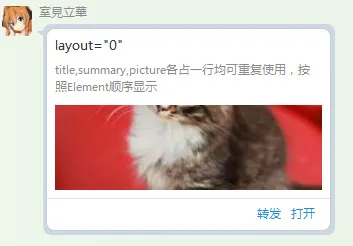

layout="1" -
会留空,用意不明
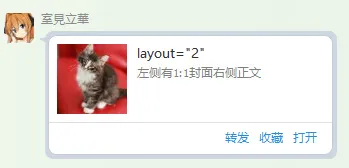
layout="2" 左中图右文字
<?xml version="1.0" encoding="utf-8"?>
<msg templateID="12345" action="web" brief="TEST" serviceID="1" url="http://koukuko.com">
 <item layout="2">
  <title>layout="2"</title>
        <summary>左侧有1:1封面右侧正文</summary>
        <picture cover="http://placekitten.com/100/100"/>
 </item>
</msg>

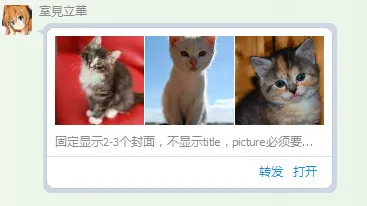
layout="3" 三图
<?xml version="1.0" encoding="utf-8"?>
<msg templateID="12345" action="web" brief="TEST" serviceID="1" url="http://koukuko.com">
 <item layout="3">
        <picture cover="http://placekitten.com/100/100"/>
  <picture cover="http://placekitten.com/200/200"/>
  <picture cover="http://placekitten.com/300/300"/>
  <title>layout="3"</title>
        <summary>固定显示2-3个封面,不显示title,picture必须要在最前面</summary>
 </item>
</msg>

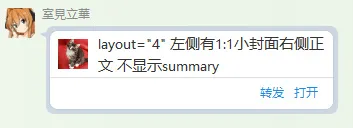
layout="4" 左小图右文字
<?xml version="1.0" encoding="utf-8"?>
<msg templateID="12345" action="web" brief="TEST" serviceID="1" url="http://koukuko.com">
 <item layout="4">
  <title>layout="4" 左侧有1:1小封面右侧正文 不显示summary</title>
        <summary>左侧有1:1小封面右侧正文</summary>
        <picture cover="http://placekitten.com/100/100"/>
 </item>
</msg>

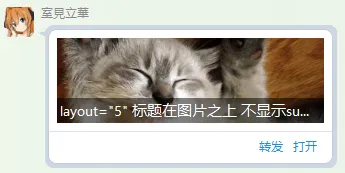
layout="5" 标题在图片之上且有黑底
<?xml version="1.0" encoding="utf-8"?>
<msg templateID="12345" action="web" brief="TEST" serviceID="1" url="http://koukuko.com">
 <item layout="5">
  <title>layout="5" 标题在图片之上 不显示summary</title>
        <summary>标题在图片之上</summary>
        <picture cover="http://placekitten.com/400/200"/>
 </item>
</msg>

layout="6"`
和 1 类似
element
在<item>中可选的 element
<title>
标题
attribute
无
<picture>
封面图片
attribute
| attribute | value | description |
|---|---|---|
| cover | ${String} | 图片 URL |
<summary>
正文文本
attribute
| attribute | value | description |
|---|---|---|
| size | ${Int} | 文字大小(仅手机端支持) |
| color | ${Int16_hex} | 文字颜色 如:#000000 |
<button>
按钮,按钮只有手机端可见,手机端下一排可现实两个按钮,必须使用layout="3"的排版才可以正常使用,但是``layout="3"```的排版在 PC 上无论如何都会显示出 3 个封面图,因此不推荐使用。
attribute
| attribute | value | description |
|---|---|---|
| action | app、plugin | appAPPplugin插件 |
| p_actionData | {String} | - |
| a_actionData | {String} | 安卓下的 schema |
| i_actionData | {String} | iOs 下的 schema |
<br/>
换行
<hr/>
分割线
attribute
| attribute | value | description |
|---|---|---|
| hidden | {Boolean} | 显示或隐藏分割线 |
<source>
attribute
| attribute | value | description |
|---|---|---|
| url | {String} | 点击角标后打开的 url |
| icon | {String} | 角标图片的地址 |
| name | {String} | 角标的名称 |
| action | app、plugin | app点击角标打开 APPplugin插件 |
| appid | {Int} | http://open.mobile.qq.com/ 下的 appid |
| p_actionData | {String} | - |
| a_actionData | {String} | 安卓下的 schema |
| i_actionData | {String} | iOs 下的 schema |
from __future__ import annotations

from html import escape
from typing import Any, Dict, List, Literal, Optional, Union

from pydantic import BaseModel
from pydantic.color import Color
from pydantic.networks import AnyHttpUrl


def _to_property(key: str, value) -> str:
    return f"{key}='{escape(str(value))}'" if value is not None else ""


def _many_property(args: Dict[str, Any]) -> str:
    return " ".join(_to_property(key, value) for key, value in args.items())


class XMLEntity(BaseModel):
    flag: Literal[0, 1, 2, 3] = 0
    service_id: Literal[1] = 1
    brief: str
    template_id: Literal[1, 12345] = 1
    action: Literal["web", "plugin"] = "plugin"
    uri: Optional[AnyHttpUrl] = None

    item: EntityItem
    source: Optional[EntitiySource] = None

    def to_element(self) -> str:
        return (
            "<?xml version='1.0' encoding='utf-8' standalone='yes'?>"
            + "<msg "
            + _many_property(
                {
                    "flag": self.flag,
                    "serviceID": self.service_id,
                    "brief": self.brief,
                    "templateID": self.template_id,
                    "action": self.action,
                    "uri": self.uri,
                }
            )
            + ">"
            + self.item.to_element()
            + ("" if self.source is None else self.source.to_element())
            + "</msg>"
        )


class EntityItem(BaseModel):
    layout: Literal[0, 1, 2, 3, 4, 5, 6] = 0
    bg: Union[Literal[0, 1, 2], Color] = 0

    title: str
    picture: List[ItemPicture] = []
    summary: Optional[ItemSummary] = None
    button: Optional[ItemButton] = None

    def to_element(self):
        return (
            "<item "
            + _many_property(
                {
                    "layout": self.layout,
                    "bg": self.bg.as_hex() if isinstance(self.bg, Color) else self.bg,
                }
            )
            + ">"
            + ("" if self.title is None else f"<title>{escape(self.title)}</title>")
            + ("" if self.summary is None else self.summary.to_element())
            + "".join(pic.to_element() for pic in self.picture)
            + ("" if self.button is None else self.button.to_element())
            + "</item>"
        )


class ItemPicture(BaseModel):
    cover: AnyHttpUrl

    def to_element(self):
        return "<picture " + _many_property({"cover": self.cover}) + "/>"


class ItemSummary(BaseModel):
    size: Optional[int] = None
    color: Optional[Color] = None

    text: str

    def to_element(self):
        return (
            "<summary "
            + _many_property(
                {
                    "size": self.size,
                    "color": self.color.as_hex() if self.color else None,
                }
            )
            + ">"
            + escape(self.text)
            + "</summary>"
        )


class ItemButton(BaseModel):
    action: Literal["app", "plugin"] = "app"
    pc_action: Optional[str] = None
    android_action: Optional[str] = None
    ios_action: Optional[str] = None

    def to_element(self):
        return (
            "<button "
            + _many_property(
                {
                    "action": self.action,
                    "p_actionData": self.pc_action,
                    "a_actionData": self.android_action,
                    "i_actionData": self.ios_action,
                }
            )
            + "/>"
        )


class EntitiySource(BaseModel):
    url: Optional[AnyHttpUrl] = None
    icon: Optional[AnyHttpUrl] = None
    name: str
    action: Literal["app", "plugin"] = "app"
    appid: int = -1

    pc_action: Optional[str] = None
    android_action: Optional[str] = None
    ios_action: Optional[str] = None

    def to_element(self) -> str:
        return (
            "<source "
            + _many_property(
                {
                    "url": self.url,
                    "icon": self.icon,
                    "name": self.name,
                    "action": self.action,
                    "appid": self.appid,
                    "p_actionData": self.pc_action,
                    "a_actionData": self.android_action,
                    "i_actionData": self.ios_action,
                }
            )
            + "/>"
        )


XMLEntity.update_forward_refs()
EntityItem.update_forward_refs()